Iris Manager 2.50 : nouvelle interface

Iris Manager se rapproche toujours plus de son principal concurrent, le célèbre MultiMan. S'il est vrai que ce dernier propose de nombreuses fonctionnalités, des personnes le trouvent beaucoup trop lourd à utiliser pour au final lancer simplement des jeux. C'est donc là qu'Iris Manager retrouve tout son intérêt. Même s'il n'a pas à rougir, il propose tout de même nettement moins d'options lui permettant ainsi d'être relativement simple à utiliser. Cependant, Estwald (Hermes), D_Skywalk et Miralatijera, les développeurs d'Iris Manager, le mettent à jour régulièrement pour apporter son lot de corrections de bugs ou encore de fonctionnalités.
A partir de cette version, Estwald précise qu'il n’effectuera plus de mises à jour mineures et qu'il n'ajoutera plus de nouvelles fonctions. Il développera donc uniquement une mise à jour pouvant être nécessaire au fonctionnement de son loader.
What’s New in version 2.50:
NOTE: From this version, I will be partially retired. Or put in another way: I will not be as active as before (only in case of “extreme” need I would work on it) and I hope that the inclusion of the new GUI other people are encouraged to continue to maintain and improve the program: I have done everything possible to provide all the tools and materials needed, but now it’s time to take a break and do other things and maybe others take over if they want to continue to implement things.
1) Added a separate loader and isolated application itself in principle from the LIBFS patched, but this could open other possibilities.
2) Added a status check of Network and warning messages in case of error, for FTP
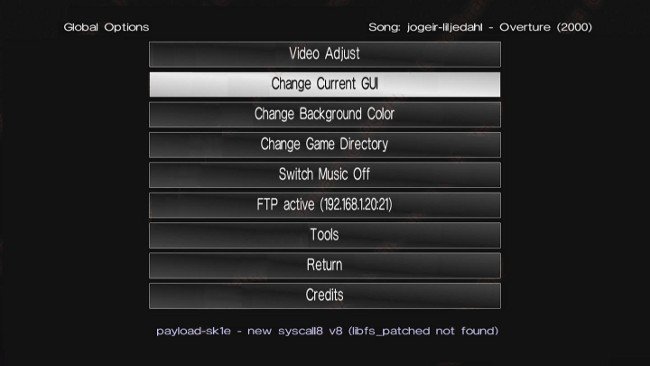
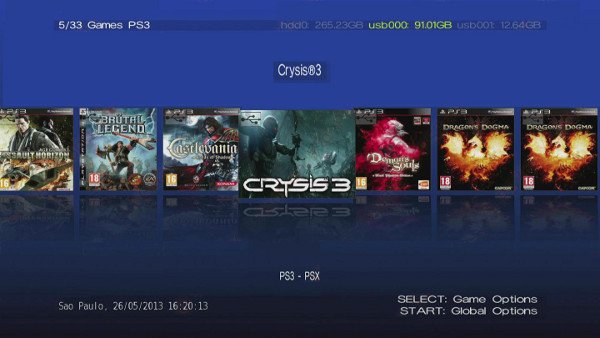
3) New GUI format “slide icons” accessible “Global Options” (Global Options) -> “Change Current GUI” (Change Current GUI), with new colors with smooth gradient background.
New Controls:
DPAD LEFT / RIGHT: move one position to the left or right
L1/R1: Scroll up and jumping a number of positions within the icons
DPAD UP: Toggle between favorites / Games
DPAD DOWN: Changes to Games, managing change games as follows (shown in the screen below-center):
PS3 – PSX: Displays all the games in alphabetical order
PS3> PSX: Displays first PS3 games in alphabetical order and then PSX equally (ie, separating the groups and shows first PS3)
PSX> PS2: Sample first PSX games in alphabetical order and then the PS3 in the same way (ie, separating the groups and shows first PSX)
The settings are stored: note that it is not the same as pressing L3/R3
Favorites Mode
- They are still 12 and you can add / remove or exchange options positions from holding down L2 and then TRIANGLE
Information Display
Top – Left: Favorite Mode / Games (set current / number of total games)
Top – Center: Game Title
Top – Right: Devices connected. In Yellow which contains the current game
Bottom – Left: In the inset shows the configuration of the games, if you need a BR disc, Direct Boot with an arrow, BD Emu or LIBFS. Below, date / time of the system.
Down – Center: management mode icons as described above.
Bottom-Right: active FTP Server icon, temperature data, etc.
Reloading Icons
12 remains the maximum although the slider samples from 5 to 7, depending on the width of these (covers in multiMAN format, fit 7). Reload is improved by assigning icons in priority first from hdd0, then from USB and finally from BDVD in background.
The system has been designed considering the speed and agility when you’re searching for a game.